
Dokumentation v1.0 - Updated 02 Jun 2026
API Documentation
Use CodiPi as an OpenAI-compatible base URL for apps, coding agents, and IDE tools.
Credentials
Set these credentials in your OpenAI-compatible SDK or agent app.
Python Integration
Install the OpenAI SDK and point it to your CodiPi base URL.
from openai import OpenAI
client = OpenAI(api_key="YOUR_API_KEY", base_url="https://codipi.asharirasyid.my.id/v1")
response = client.chat.completions.create(
    model="codipi-free",
    messages=[{"role":"user","content":"Hello CodiPi"}]
)
JavaScript / Node.js
Use the official OpenAI SDK with a custom baseURL.
import OpenAI from "openai";
const client = new OpenAI({ apiKey: "YOUR_API_KEY", baseURL: "https://codipi.asharirasyid.my.id/v1" });
const res = await client.chat.completions.create({
  model: "codipi-free",
  messages: [{ role: "user", content: "Hello CodiPi" }],
  stream: true
});
Kilo Code IDE Extension
Choose Costum Provider and fill the values manually.
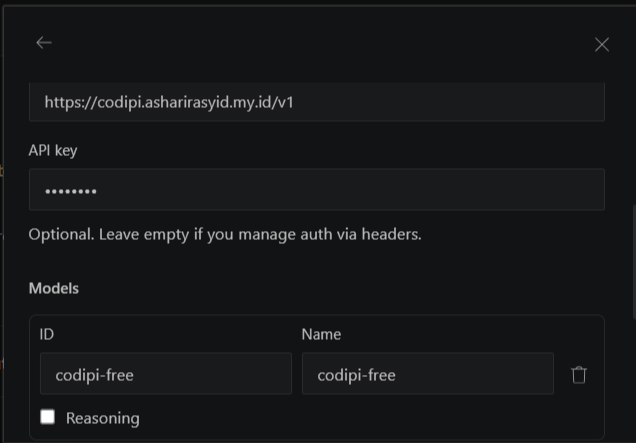
Provider: Costum Provider
Id : codipi
Name : CodiPi
Base URL: https://codipi.asharirasyid.my.id/v1
API Key: codipi-free
OpenCode IDE Extension/Desktop
Choose Costum Provider and fill the values manually.
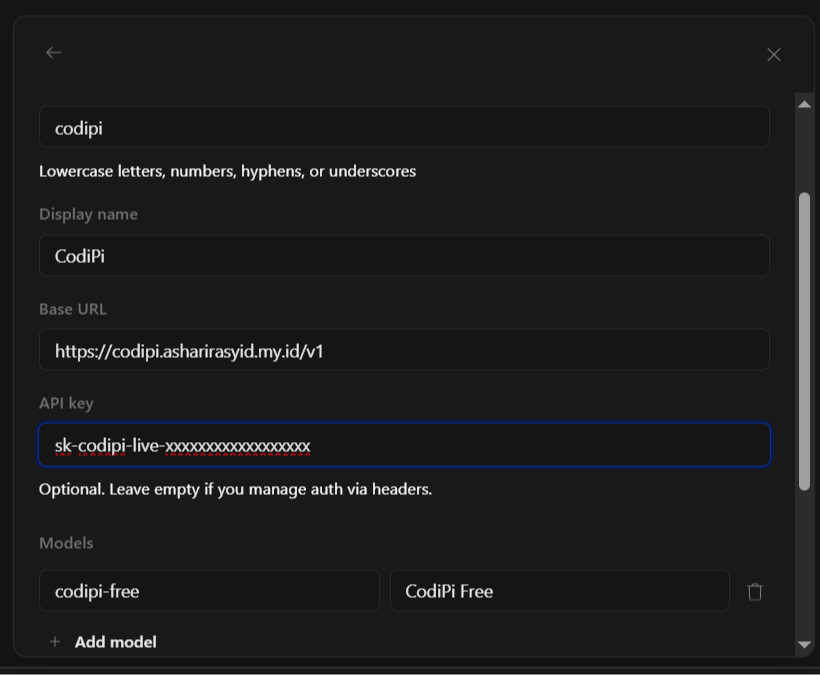
Provider: Costum Provider
Id : codipi
Name : CodiPi
Base URL: https://codipi.asharirasyid.my.id/v1
API Key: codipi-free
List Models
List model aliases available to your API key.
curl https://codipi.asharirasyid.my.id/v1/models \
  -H "Authorization: Bearer YOUR_API_KEY"
Chat Completions
Send messages and receive a model response.
curl -X POST https://codipi.asharirasyid.my.id/v1/chat/completions \
  -H "Content-Type: application/json" \
  -H "Authorization: Bearer YOUR_API_KEY" \
  -d '{"model":"codipi-free","messages":[{"role":"user","content":"Hello"}],"stream":true}'
Image Completions
Generate images with enabled image model aliases.
curl -X POST https://codipi.asharirasyid.my.id/v1/images/generations \
  -H "Content-Type: application/json" \
  -H "Authorization: Bearer YOUR_API_KEY" \
  -d '{"model":"image","prompt":"A clean dashboard"}'
Troubleshooting
401 means API key missing or invalid. 403 means inactive key, expired subscription, or model not assigned. 429 means quota reached.